Unlocking the Factory Floor: Real-Time Manufacturing Insights with IoT and Azure Synapse Analytics

Modern manufacturing is far superior and advanced than its predecessors; the sheer amount of efficiency and agility is far greater.

This is all thanks to modern machinery and devices.

The factory floor has a changed dynamic thanks to the Internet of Things (IoT), or simply put, the increasing number of smart devices, such as sensors, monitoring machines, and robots, used to automate mundane repetitive tasks.

These machines yield a ton of data that can be used to revolutionize operations.

However, data in its raw form is useless; we can only use it once it is processed into actionable insights.

This is where we use Azure Synapse Analytics, which is a data analytics service provided by Microsoft. 

Azure offers a platform that enables us to analyze and integrate all IoT data in real-time, allowing us to step into the era of intelligent manufacturing.

In this article, we will talk about Azure Synapse and how we can integrate it into our manufacturing.

We will also talk about the real-time data flow architecture and analytics within Synapse.

We will also cover all the challenges and considerations that are involved in this transformative journey.
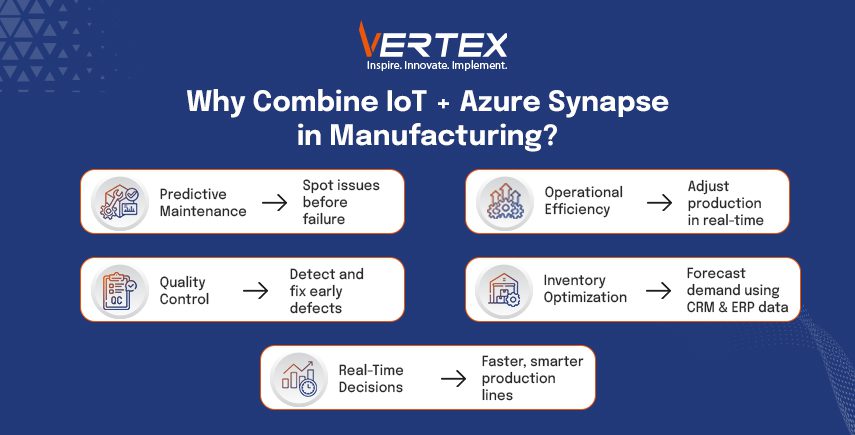
Infographic on IoT and Azure Synapse in manufacturing, highlighting predictive maintenance, quality control, and efficiency.

Benefits of Integrating IoT Data with Azure Synapse

The interaction between IoT data and Azure Synapse Analytics will unlock several benefits for the manufacturing organisations.

The primary shift is from reactive to predictive maintenance.

To put it into simpler terms, with the sensor’s real-time data on machine performance, manufacturers can identify anomalies and predict breakdowns or even small errors before they occur.

This is predictive maintenance, which saves precious downtime and optimizes our maintenance schedule.

Operational efficiency also benefits from real-time monitoring of production lines.

This enables manufacturers to make immediate adjustments to optimize production, minimize waste, and enhance overall equipment effectiveness (OEE). 

Integrating IoT data with Synapse results in better quality control.

When we analyse the sensor data in real-time, it helps us identify the defects and anomalies at an early stage.

Then the manufacturers can take corrective actions and minimize the production of faulty goods.

This not only saves precious downtime but also results in a better-quality product and less scrap material.

Synapse Analytics also takes care of your business data as well, once you have combined the IoT data with other enterprise data sources.

Data sources, such as ERP and CRM, ensure accurate demand forecasting and optimized inventory management.

The ability to do all these calculations and generate results in real-time is what makes the difference in the manufacturing business.

Key Azure Services for IoT Data Integration

Azure offers services that make the integration of Synapse seamless, and you can also process and store IoT data.

Azure acts as a hub that is responsible for communication between the IoT devices and the cloud.

This message hub is secure and is meant for two-way communication.

This hub is able to handle huge volumes of data from different devices and also ensures safe device management.

When data arrives from the IoT hub, Azure Stream Analytics processes it in real-time.

This ensures the processing, filtering, aggregation, and enrichment of data streams before they are sent to Synapse for further analysis. 

Azure Event Hubs offers an ingestion service that can handle millions of events per second.

This makes it suitable for high-throughput IoT scenarios.

If long-term storage for raw and processed IoT data is what you want to do, you can use Azure Data Lake Storage Gen2.

This is more cost-effective and also works seamlessly with Synapse.

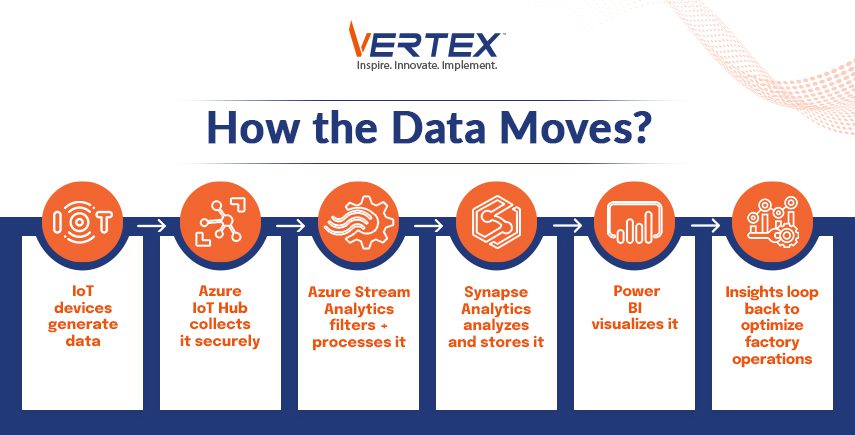
When you combine these services, you get a scalable IoT data integration with Azure Synapse.Infographic showing data flow from IoT devices to Azure tools, processing, storing, visualizing, and optimizing factory operations.
Real-Time Data Flow Architecture

There are several key stages in a real-time data flow architecture for integrating IoT data with Azure Synapse.

The data originates from the factory floor through various IoT devices and is then securely transferred to Azure IoT Hub.

Then, the data is processed using Azure Stream Analytics in real-time.

Operations are then performed, such as filtering signal data points over windows and detecting anomalies based on predefined rules or different machine learning models. 

The processed and refined data is then fed to Azure Synapse Analytics, where it is converted into real-time dashboards and insights.

The data is also used for SQL pool for performing analytical workloads.

Data is kept in Azure Data Lake Storage Gen2 for more thorough historical analysis and machine learning tasks.

The stored data is accessible to the Synapse Spark pool, which uses this data for large-scale data processing and machine learning model training.

Since Power BI is integrated with Synapse, it can be used to visualize real-time and historical data for making dashboards and reports. 

These can greatly benefit the stakeholders by helping them mark actionable items based on this data, and then these changes can be directed to the factory floor. 

Data Modeling and Analytics in Synapse

Effective data modeling is necessary for optimizing query performance and conducting a meaningful analysis of IoT data.

Time series data is a crucial characteristic of the IoT streams, as temperature is taken every ten minutes, as time is crucial in this.

Similarly, instead of putting a lot of related data into different tables, we can put relatable data into a single table, which can be useful when we need to find answers.

Example: if we put temperature, time, and machine ID in a single table, then we can easily answer the question regarding the reading temperature of that machine in the past hour. 

If you are looking for more advanced analytics, then Synapse Spark also provides a powerful environment for running machine learning algorithms on the historical IoT data, which is stored in the data lake.

This is then used in the development of predictive maintenance models, anomaly detection systems, and optimized control algorithms.

Use Cases and Success Stories

We have already learned how combining IoT data with Azure Synapse Analytics delivers great results for various manufacturing organizations worldwide.

With predictive maintenance, companies have been able to avoid a lot of unplanned downtime and maintenance costs.

There is also the benefit of real-time monitoring of production lines, which allows the manufacturer to identify and clear bottlenecks immediately, resulting in increased throughput and reduced waste. 

When we use quality control alongside real-time analysis of sensor data, it minimizes the production of defective goods, leading to improved customer satisfaction and reduced scrap waste.

Security and Compliance

The interconnected world of IoT and cloud analytics is all about compliance and security.

Azure Synapse Analytics and the associated Azure IoT services make sure there are security features at every layer, and the data in transit is secured through industry-standard encryption.

Even in Synapse, Azure Active Directory provides identity and access management, allowing for granular control over who can access and process data.

Azure’s comprehensive compliance certifications ensure adherence to industry-specific regulations.
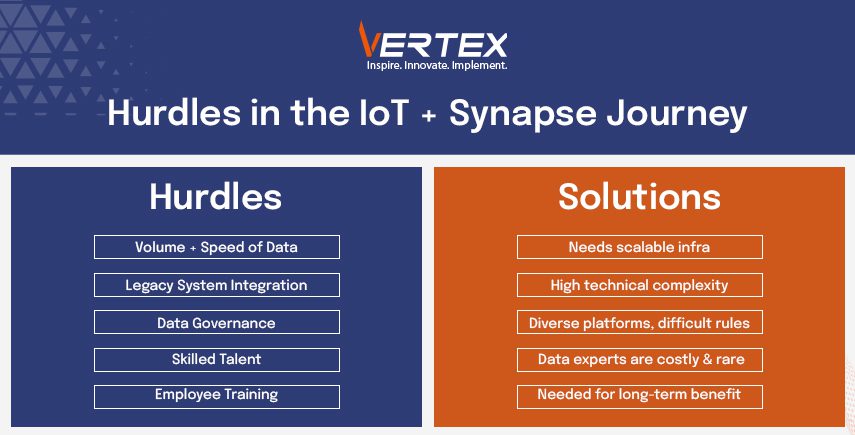
Infographic on IoT and Synapse challenges: data volume, legacy integration, governance, talent, training, with scalable infra solutions.

Challenges and Considerations

Though we can agree that integrating IoT data with Azure Synapse is positively fruitful, we can not ignore the challenges that are associated with the process.

The sheer volume and the speed of the data require a stable and scalable architecture.

There is the issue of integrating old manufacturing systems with cloud platforms, which presents numerous technical hurdles, and governing data across different IoT platforms can be very complex. 

To build and maintain data pipelines, you need data science and engineering experts, who are challenging to source and an expensive resource.

Organisations also need to train their employees so that they can understand the system and navigate through it efficiently.

If this is followed, then it is beneficial for the organisation in the long run. 

By embracing the power of IoT data and the analytical capabilities of the Azure Synapse, manufacturing organizations can profit a lot.

Their overall efficiency, agility, and intelligence will rise and start the new era of operational excellence. 

Enterprise IT Transformation with Microsoft

Application Integration for Digital Transformation

Application Integration is the process of enabling different digital applications – each developed for a specific purpose – to work with each other. When configured properly, integration allows distinct systems to seamlessly communicate.

In today’s world, Enterprise IT Transformation invariably includes leveraging the Cloud.  As organizations re-engineer their business processes, leveraging On-Premise systems and investments that are already in place and integrating them with new cloud-based solutions is key to cost-effectively stand up new capabilities and services.

Cloud-based app integration is pivotal in business process augmentation, involving various tools and technologies. With clear planning, app integration can reduce IT silos and improve connectivity to integrate applications that unify management, ease access, and limit manual intervention by utilizing various ready-to-plug-in Microsoft Azure Cloud tools and services.

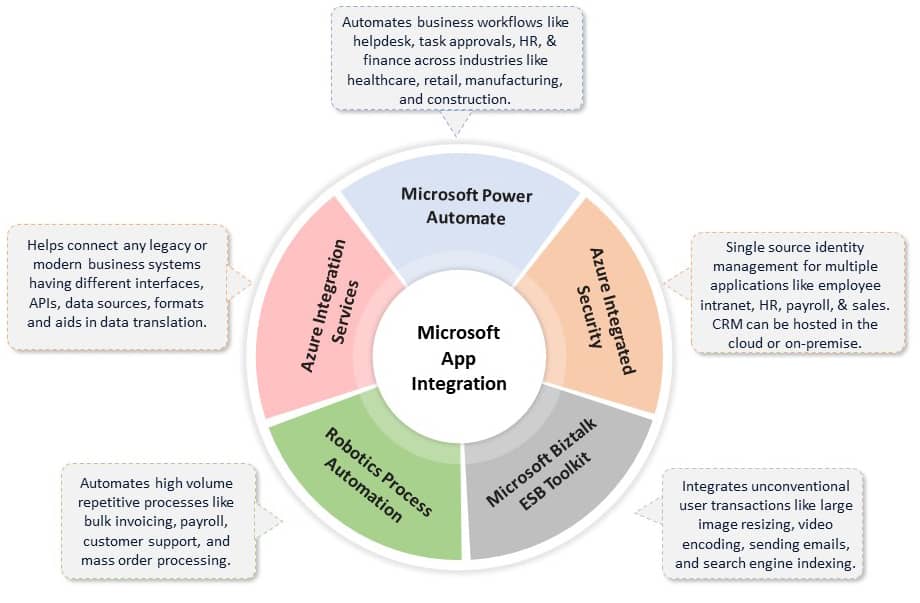
Microsoft offers several App Integration options to build solutions that connect applications and services on-premises and in the cloud.

  • Azure Integration Services enable scalable systems that can orchestrate business processes to connect On-Premise and cloud services using Service Bus, Logic Apps, API Management, and Event Grid.
  • Power Automate (earlier MS Flow) is a service-level offering that can be used to build codeless workflows to integrate business processes using hundreds of inbuilt connectors with disparate M365-based or marketplace applications.
  • Robotics Process Automation through the Power Automate platform using UI Flows builds end-to-end business process automation solutions. Coupled with AI-enabled Power Virtual Agents, it lets domain experts in your company create bots with a guided, no-code graphical interface to automate repetitive and manual efforts to improve productivity.
  • Azure Integrated Security powered by Azure Active Directory and Microsoft Graph allows seamless security integration among users in an organization and all tools and services hosted in Cloud or On-Premise. Features likes Azure B2B and Azure B2C helps extend application access capabilities and controlled permission management to vendors and partners outside the organization.
  • Microsoft BizTalk ESB Toolkit provides the capabilities to build message-based enterprise applications using a collection of tools and libraries that extend BizTalk Server’s capabilities of supporting dynamic messaging architecture to enable rapid mediation between services and their consumers.

App Integration Use Cases

Vertex App Integration

Why Vertex?

As a Gold Certified Microsoft Application Integration Partner, we have certified resources ready to go on all these empowering technologies. Vertex can help you evaluate your integration landscape and cloud integration strategy and build a migration path. Microsoft has recognized our expertise in the areas of Application Integration and Enterprise Business Process Automation.

An Introduction to the Azure DevOps Toolset

This is the third in a series of blog posts about DevOps. We started the series talking about the organizational mindset to achieve zero-defects code, then spent some time talking about how IT teams may need to evolve to create the right organizational culture for DevOps success.

In this post, we start to delve into DevOps toolsets, specifically Microsoft Azure DevOps Services.

It has been said that tools don’t make the mechanic, but that the right tools in the right hands can make everyday jobs far more efficient. I say that as an introduction to this article about DevOps toolsets. Tools (or one person) will not automatically transform an IT department into a DevOps shop, but a department that has adopted the culture and organization to follow DevOps practices WILL benefit from a suite of DevOps tools as they mature.

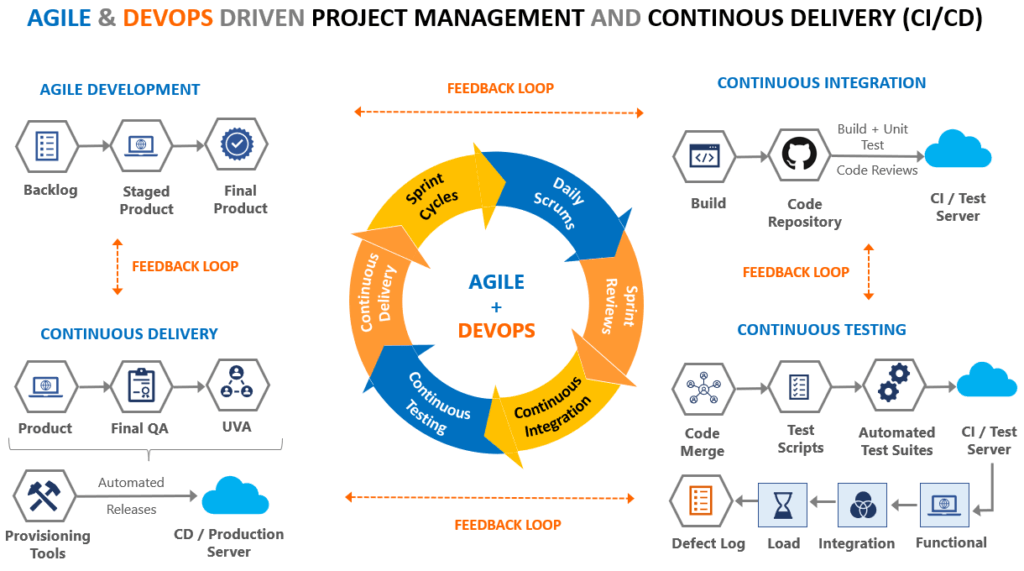
Devops Pm Tools

Just some of the benefits of a DevOps toolset include the standardization and automation of development processes, improved collaboration within and among the teams, consolidated code repositories, work-item tracking, automated testing, and release pipelines.

Read our Whitepaper: Design for Scale Using Microsoft Azure Services

Microsoft’s Azure DevOps Services is probably the most comprehensive toolset out there. While it is broad in its scope, pay-as-you-go licensing allows organizations to choose the components that they need now and to add additional components as they mature and grow.

Let’s look at a few Azure DevOps’ components:

Azure Boards

As releases get smaller and increase in frequency, it gets harder to collect and track work items. Azure Boards combine flexible work item tracking with drag-and-drop sprint planning. Your team will be more productive with Boards, Backlogs, and Sprints all kept together. What’s better, Azure Boards can be connected to your GitHub repository to link comments and PRs to work items.

Kanban, Scrum, Agile, Lean? Azure Boards works with any number of project management methods and is easily adapted to the needs of your team.

Azure Pipelines

Azure Pipelines automates builds and deployments, regardless of language or platform. What’s more, you can run parallel pipelines for Linux, macOS, and Windows. As you’d expect, Pipelines completely integrate with your Git repositories.

You can also ensure continuous delivery (CD) of your product to the cloud environment of your choice. Azure, of course, along with Amazon Web Services and Google Cloud Platform.

Microsoft uses Pipelines themselves at the .NET Foundation. Before Pipelines, their engineering team was dealing with dozens of different git repositories, a broad range of tools, and several different continuous integration (CI) systems, creating confusion and inhibiting productivity. Just one of their components runs more than 600,000 automated tests for each pull request. With more than 50 pull requests per week, each with multiple iterations, the number of tests was in the billions.

The .NET Engineering Services team brought in AzureDevOps and Pipelines to bring all repos under a common directory structure, set of commands, and build-and-test logic. The team eliminated further barriers to productivity by moving all existing workflows from the different CI systems into a single system.

Azure Repositories

With support for everything from a ‘hobby’ project to the largest codebase in the world, Azure Repositories offers unlimited & private Git hosting as well as support for Team Foundation Version Control (TFVC).  What’s more, Azure Repositories allows you to set up continuous integration & continuous delivery (CI/CD) to automatically trigger builds, tests, and deployments with every completed pull request whether using Azure Pipelines or your own tools.

Azure Repositories also protect your codebase and your quality metrics with completely customizable branch policies. You can keep code quality high by requiring code reviewer signoff, successful builds, and passing tests before pull requests can be merged.

An added bonus is that Azure Repositories features a code-aware semantic search tool that understands classes and variables, making it easier to find what you’re looking for.

Azure Test Plans

There are manual test plans and automated test tools, but Azure Test Plans bring them together.

Manual test plans can be created, executed, and tracked with actionable defects and end-to-end traceability. Assess quality throughout the development lifecycle by testing your desktop or web applications.

Exploratory test sessions allow the design and execution of tests simultaneously to maximize quality in modern software development processes.

As noted above, automated testing is a major component of Azure Pipelines.

Azure Artifacts

When you’re ready to release, Azure Artifacts adds fully integrated package management to your CI/CD pipelines with a single click. Create and share Maven, npm, NuGet, and Python package feeds from public and private sources with teams of any size.

Because the packages are pre-built, they are easily shared & managed, and can easily be added to Azure Pipelines for testing and release.

Integration Reduces Risk

Because Azure DevOps is flexible enough to integrate with your existing tools and processes while offering all of the tools you need for DevOps success, it ultimately reduces the risk of migration to DevOps. Integration with Microsoft Power BI allows managers to track metrics across the development organization to ensure that their migration to DevOps is on track and to quickly identify and correct where there might be weaknesses.

Click here to learn more about the metrics that you should be tracking to measure the succes of your DevOps organization.

Better Operations Equals Better Business

While DevOps certainly offers many benefits to IT teams, the gains go well outside of that silo.

Faster development cycles allow businesses to push out new features faster, allowing them to be more agile in responding to their competition and to new requests from customers.  Furthermore, a tightly integrated CI/CD platform means less downtime – and less downtime equals more revenue!

Partner With a Certified Azure DevOps Leader

Vertex has thirteen engineers certified at Microsoft’s highest level in Azure DevOps. Look to the DevOps experts at Vertex to guide your way to the efficiencies of DevOps and to help you choose the right tools to create repeatable, clean releases. We Got IT.

Cream Rises: Two Vertex Coders Finish in the Top Ten of the Microsoft Cloud Skills Challenge

The India Microsoft Cloud Skills Challenge is a contest that attracts some of the brightest minds in software engineering and pushes them to perform feats of coding ingenuity. For 72 hours in mid-October, over 1,000 people in India battled in this tournament of intellect, creativity, and skill.

Vertex is pleased to share that our own Bhavani Pallekonda, Software Engineer, and Jagadeesh Srirangapuram, Senior Software Programmer, rose to respective second and ninth places. Vertex congratulates Bhavani and Jagadeesh for their initiative and hard work as they completed a series of tutorials, browser-based interactive coding, and scripting. The Microsoft Cloud Skills Challenge is part of the Partner Leadership Conclave 10, a virtual event that gives developers a chance to show off their skills and compete for prizes. “It’s an interactive way to learn the new things,” Pallekonda says. “Also, we were excited to complete the tasks.” Srirangapuram, who loves a good challenge, found the experience rewarding. “Initially, I never expected this high of a result,” he says. “But, it was fruitful. It was exciting to be challenged at each stage of the competition. I exceeded my expectations.”


Microsoft Cloud Challenge Winners

Two top-ten finishers prove our team’s talent, hard work, and spirit of success. “It’s a pleasure to see two of our associates place so highly,” says Sudip Nandy, Head of Delivery, Hyderabad. “Not a small achievement against more than 1,000 competitors. I’m extremely proud of them.”

Additionally, 14 other Vertex employees took part in the contest, and all finished respectably. “It was gratifying to see so much interest from our team,” Sudip continued. “Vertex was well represented, and I know that if challenging weather conditions in Hyderabad didn’t interfere – causing power outages – all our contestants would have come through with flying colors.”

Not only is this distinction a feather in the cap of our associates, but it also gains Vertex visibility in the Microsoft Partner Network. “Congratulations to the team for participating and kudos to Bhavani and Jagadeesh for making the top ten,” says Ganesh Iyer, Principal. “This is an incredible achievement and will help elevate our brand as an elite partner in the Microsoft ecosystem.”

A round of applause to Vertex’s full team of participants:

  • Thomas Anthony
  • Nihanth Balabhadra
  • Viswa Bandaru
  • Seetharam Bheemavarapu
  • Muralikrishna Chinigi
  • Prashanthi Geedula
  • Gopala Rao Gollapalli
  • Abdul Hak
  • Satish Kulala
  • Pradeep Madasu
  • Bhavani Pallekonda
  • Suvarchala Pantam
  • Jagadeesh Srirangapuram
  • Seetharama Rao Tungaturti
  • Gopinath Vemulapalli
  • Sudeep Yadagiri
loader
Vertex Computer Systems is Hiring!Join the Team »
+